

 GitKraken Desktop
 GitLens for IDEs
 Kepler
 GitKraken MCP
 GitKraken CLI
 GitKraken Insights
 Git Integration for Jira
 Dev Team Automations
 AI & Security Controls
 Supercharge Your Dev Team
 Secure Your Dev Team


I kept seeing people talking about “Software Factories” on social media, but I’ll admit that I had no idea what a software factory was. So, I put in some time to read up on it. Shockingly, I still see people saying it’s the same as a Ralph Loop, but I disagree. I’m still not an expert but I’ll do my best to explain them and how I think Kepler makes setting one up into an easy and approachable process.

The Basics
These days, a Software Factory is “an automated and repeatable version of the software development lifecycle (SDLC) driven mostly by AI agents”. Yes, I looked up that definition. Back in the day, a software factory referred to the human-based way that software teams worked at companies like Microsoft or even governmental entities like the Department of Defense (DOD).
Even though AI has taken over the definition, the roots are kind of the same. You have tickets that might be assigned to you via something like Jira. You might have issues created on GitHub by your users. You might also have prod exceptions captured by something like Sentry, Posthog, or if you’re old school, New Relic. Before AI, you would have a process to farm out that work to a member of your team. Now, you do the same thing but that member of your team is an agent.
How Kepler Can Help
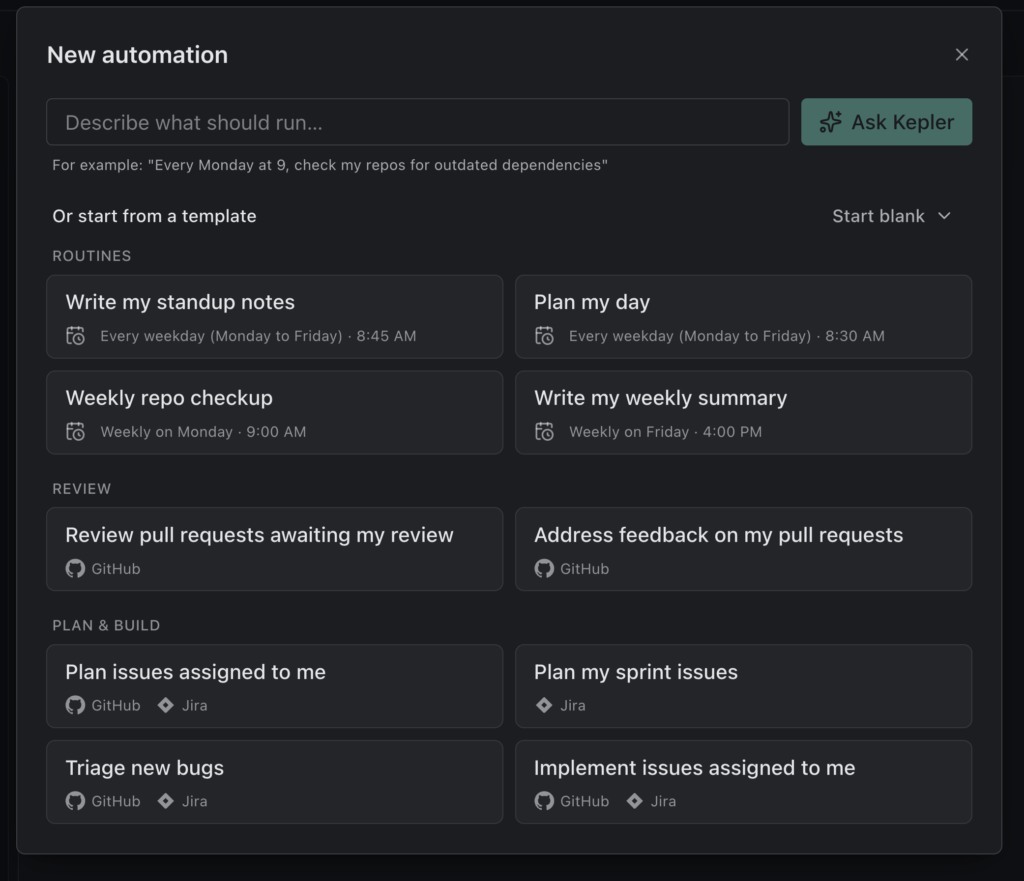
Automations are an awesome new feature that we have introduced in Kepler. As far as my preferences go, it’s probably still in second place behind the remote access tunnel I can use from my phone. But, the automations are growing on me lately because it makes it so much easier to get work started on things that would otherwise require me to go out to some dashboard or website to see them.
Automations: Part 1 – The Heartbeat
I have Sentry and Posthog set up on several side projects. Of course, I have exceptions in the backend that I haven’t fixed, yet. Luckily, I use Elixir, so an exception in my backend doesn’t take down my services like it might in some other languages. But, those exceptions still need to be fixed.
A newer feature to Kepler allows me to set up heartbeats (scheduled automations) that can run on a wide range of intervals. Those heartbeats can use the corresponding MCP servers from Sentry and other sources to find new exceptions and create tasks to explore them. You just need to decide on the schedule and give it a prompt that will use the appropriate MCP servers and skills.

Automations: Part 2 – The Eventing
The simplest automations to set up are the ones that trigger based off of issues and pull requests. If you get assigned an issue or get tagged as a reviewer on a pull request, you can have Kepler spin up a new task to get things started. These are still based on what is effectively a cron job, but you probably want to have the timer fire off hourly or maybe even more frequently to make sure you aren’t blocking the rest of your team.

Voila! My/Your First Software Factory
Software factories can just be that simple. I know it’s not as robust as some of the louder voices on social media would expect but this is a great start. If you squint hard enough, it will feel a lot like how we’ve developed software in the past. Some other events and tasks that you might want to automate could include:
- GitHub Action failures
- Monitoring a Support email inbox
- Measuring Performance and Analytics for changes
- Scanning dependencies for known vulnerabilities
- Maintaining test coverage
- etc
To wrap things up, I will leave you with this tweet from Sunil Pai:


 Add to Chrome
 Add to Firefox
 Add to Microsoft Edge
